Lenovo Legion Pro 5 Recurring Complaints: Sudden Failures, Thermals and What Owners Actually Report
Buyers considering the Legion Pro 5 want to know what goes wrong after the honeymoon, not what the spec sheet promises. This guide draws on owner discussion across several model years of the Legion Pro 5 / Legion 5 Pro line rather than benchmark testing, and it separates the two complaint patterns that recur most: units that fail outright, and heat under load. It also covers the owners who report no issues at all, because the picture is genuinely split. It does not measure frame rates; it maps ownership risk.
Known Issues Before You Buy
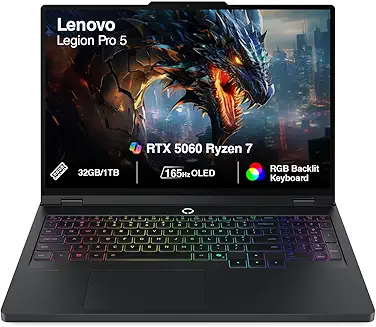
A popular mid-price gaming laptop that owners rate well on cooling, build and value, shadowed by a recurring tail of sudden-failure and high-temperature reports spanning multiple model years.
How the complaints break down
Discussion of the Legion Pro 5 leans negative, but the complaints are not one undifferentiated pile. They cluster into two recurring patterns that mean very different things for a buyer.
- Sudden hardware failure is the most-reported theme. Across multiple model years, owners describe units that die outright or become unstable.
- Heat under load is the second recurring theme. Owners report high CPU/GPU temperatures and thermal throttling, sometimes with loud fans or vibration.
The distinction matters. Thermals are expected behavior you can often mitigate; a unit that powers off and won't come back is a warranty question. Read the two separately when judging your own risk.
Sudden failures: the complaint that recurs most
The dominant recurring complaint is units that stop working. This is a consistent pattern across independent owners, not a one-off: reports include a laptop that died with the power button doing nothing, a unit that powers off instantly when unplugged even after a genuine battery replacement (owner suspects the motherboard), a new machine that randomly freezes and restarts within a week of purchase, driver-power-state crashes, and units that failed after 2 months and after roughly 4 years.
What stands out is the spread: failures show up both very early (defective within weeks) and later in the ownership window (dead after years). That is the profile of a reliability tail rather than a single defective batch. It does not mean most units fail. It means the failure mode recurs often enough that warranty terms and a responsive seller should factor into your decision.
Thermals and fan noise: common and mostly mitigable
The second recurring cluster is heat. Owners repeatedly report high CPU and GPU temperatures, including thermal throttling and, in one case, a CPU throttling near 106C on a new unit. Several tie the temps to fan behavior. Reports of temperatures spiking with low fan RPM on balanced mode suggest a fan-curve issue as much as a raw-cooling one, and repasting comes up as a common owner remedy.
Separately, more than one owner reports fan noise or physical vibration from the chassis under load. These thermal and noise complaints are the more manageable tier. Undervolting, cleaning, repasting and adjusting the power/fan profile all appear in owner discussion as ways people brought temperatures down. Budget for that maintenance if you buy.
Performance that some owners find below the spec
A smaller, repeated theme is performance that does not match the hardware on paper. More than one owner describes subpar or inconsistent performance for a machine at this tier and troubleshoots RAM, dual-channel configuration or thermals as the cause. This is not the dominant complaint, and it often overlaps with the thermal cluster (throttling suppresses performance). Treat it as a reason to verify your cooling and power settings out of the box rather than as a separate defect.
What worried buyers keep asking
The reliability reports have visibly reached prospective buyers. The hesitation shows up in the exact questions owners-to-be ask before spending.
- One buyer, weighing an OLED R7/RTX 5060 configuration, wrote that they had been "seeing so many negative reviews or experiences with legion 5 or below series" and were unsure whether to proceed.
- Another, considering a 2021 Legion 5 Pro in 2026, framed the decision as whether to "risk" buying it given the failure reports.
That is the core tension: the machine is well-regarded on performance and value, but the failure stories make buyers pause. This guide exists to help you size that risk rather than dismiss or inflate it.
Who still recommends it despite the complaints
The positive side of the discussion is real and worth weighing against the failures. Owners with trouble-free units are consistently happy, and they praise the same things that make the machine popular.
- Multiple owners single out cooling and thermals as a strength. One recommended it specifically for CPU/GPU-heavy rendering and CAD work on "great heat management", and another with a two-week-old unit reported "runs very smooth, thermals are great."
- Build quality draws repeated praise. In one direct cross-shop, a buyer who had owned both brands called the Legion Pro 5 "solid - better build quality and thermals" and described a competing brand as hit or miss. (That is one buyer's comparison, not a measured verdict.)
- Owners also note easy upgradeability (RAM) and improved performance after upgrading.
The takeaway: when a Legion Pro 5 is a good unit, owners rate it highly on exactly the axes that matter. The risk is unit-to-unit variance, not a design that everyone dislikes.
Should you buy it? A risk read
Proceed with reasonable confidence if:
- You buy from a seller with straightforward returns and honor a full warranty, so an early failure is a swap rather than a saga.
- You are comfortable doing basic thermal maintenance (cleaning, a power/fan profile, possibly a repaste later) to keep temps in check.
- You mostly use it plugged in and value cooling and performance-per-dollar.
Proceed carefully if:
- You are buying used or from a marketplace with no warranty coverage. The failure tail is the main risk, and it is exactly what a warranty protects against.
- You need a machine that will run untouched for years with zero maintenance.
Look elsewhere if:
- Absolute reliability with no tinkering is your top priority and you would rather pay more for a quieter, cooler-running design than manage temps yourself.
The honest summary: the Legion Pro 5 is a strong performer that a lot of owners love, but the recurring failure reports are real. The single best mitigation is buying it in a way that makes warranty service easy.
Evidence Highlights
Independent owners across model years report units that die outright, power off when unplugged, or freeze and restart when new.
Recurring reports of high CPU/GPU temperatures and throttling under load, sometimes tied to a low balanced-mode fan curve.
More than one owner reports audible fan noise or chassis vibration under load.
Owners without faults consistently praise thermals, build quality and smooth performance.
Check current prices
This guide is built from audited buyer discussion evidence — no paid placements, no sponsored rankings. Product inclusion and ranking are determined by evidence volume, sentiment balance, and recurring themes. Read our methodology →